Compression
Compression is used to reduce the amount of bandwidth used between peers. The compression supported by gRPC acts at the individual message level, taking message as defined in the wire formatdocument".
The implementation supports different compression algorithms. A default compression level, to be used in the absence of message-specific settings, MAY be specified for during channel creation.
The ability to control compression settings per call and to enable/disable compression on a per message basis MAY be used to prevent CRIME/BEAST attacks. It also allows for asymmetric compression communication, whereby a response MAY be compressed differently, if at all.
Decompression happens before a request message is passed to interceptors, and compression happens after a response message has exited interceptors.
CRIME and BEAST are both cryptographic attacks that target the security of web communication protocols that use Transport Layer Security (TLS).
CRIME stands for Compression Ratio Info-leak Made Easy. It is an attack that exploits the use of compression in TLS to decrypt data. The attack works by injecting malicious code into the victim's browser and then monitoring the size of the compressed data that is sent over the TLS connection. By analyzing the compression ratio of the encrypted data, the attacker can infer information about the plaintext data, such as session cookies or other sensitive information.
BEAST stands for Browser Exploit Against SSL/TLS. It is an attack that exploits a vulnerability in the way block ciphers are used in TLS to decrypt data. The attack works by intercepting the encrypted data sent between the client and server and then using a chosen plaintext attack to decrypt the data. By repeatedly decrypting small parts of the encrypted data, the attacker can gradually recover the entire plaintext message.
Both CRIME and BEAST attacks have been mitigated in recent versions of TLS. For example, TLS 1.3 removes support for compression and changes the way block ciphers are used to protect against these types of attacks. It's important to keep your TLS implementation up to date to ensure that your web communication protocols are secure
   var headers = new Metadata{new Metadata.Entry("grpc-internal-encoding-request", "gzip")};
   await context.WriteResponseHeadersAsync(headers);
Test cases
- When a compression level is not specified for either the channel or the message, the default channel level none is considered: data MUST NOT be compressed.
- When per-RPC compression configuration isn't present for a message, the channel compression configuration MUST be used.
- When a compression method (including no compression) is specified for an outgoing message, the message MUST be compressed accordingly.
- A message compressed by a client in a way not supported by its server MUST fail with status UNIMPLEMENTED, its associated description indicating the unsupported condition as well as the supported ones. The returned grpc-accept-encoding header MUST NOT contain the compression method (encoding) used.
- A message compressed by a server in a way not supported by its client MUST fail with status INTERNAL, its associated description indicating the unsupported condition as well as the supported ones. The returned grpc-accept-encoding header MUST NOT contain the compression method (encoding) used.
- An ill-constructed message with its Compressed-Flag bit set but lacking a grpc-encoding entry different from identity in its metadata MUST fail with INTERNAL status, its associated description indicating the invalid Compressed-Flag condition.
General rules
- If the compression is not enabled at the server level, it won't be applied. It won't matter if you add a Compression provider on the client-side
- too see when is applied, you need to enable the Trace log level
var options = new GrpcChannelOptions()
{
    CompressionProviders = new List<Grpc.Net.Compression.ICompressionProvider>(){
                new BrotliCompressionProvider() // br
            }
};

using var channel = GrpcChannel.ForAddress("https://localhost:7226", options);
var client = new SpeakerServiceDefinition.SpeakerServiceDefinitionClient(channel);


var metadata = new Metadata();
metadata.Add("grpc-internal-encoding-request", "gzip");

....
var response1 = client.GetById(new SpeakerFilterRequest() { Id = 7 }, metadata);
Server-side support
builder.Services.AddGrpc(options =>
{

   options.CompressionProviders = new List<Grpc.Net.Compression.ICompressionProvider>(){
       new BrotliCompressionProvider() // br
   };
   //options.ResponseCompressionAlgorithm = "gzip"; // grpc-accept-encoding
   options.ResponseCompressionLevel = CompressionLevel.SmallestSize; // compression level used if not set on the provider
})
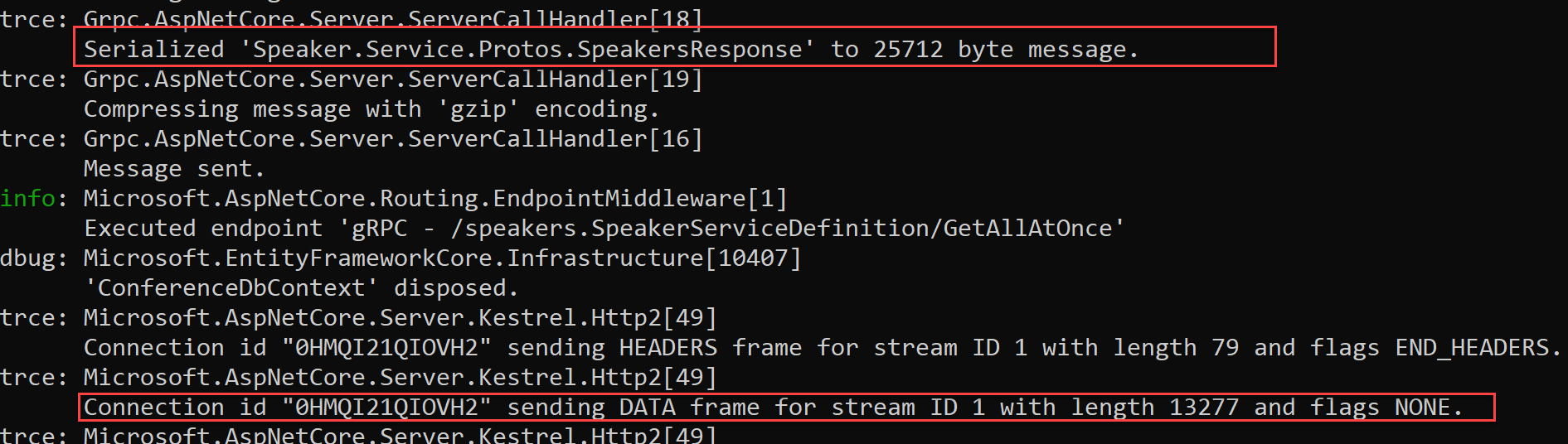
You can also enable per operation
context.WriteOptions = new WriteOptions(WriteFlags.NoCompress);